Play Spacewar Today
You don't need a $120,000 PDP-1 to experience the game that started it all. Here are all the ways to play Spacewar! on modern devices.
Quick Play Options
Browser Emulator
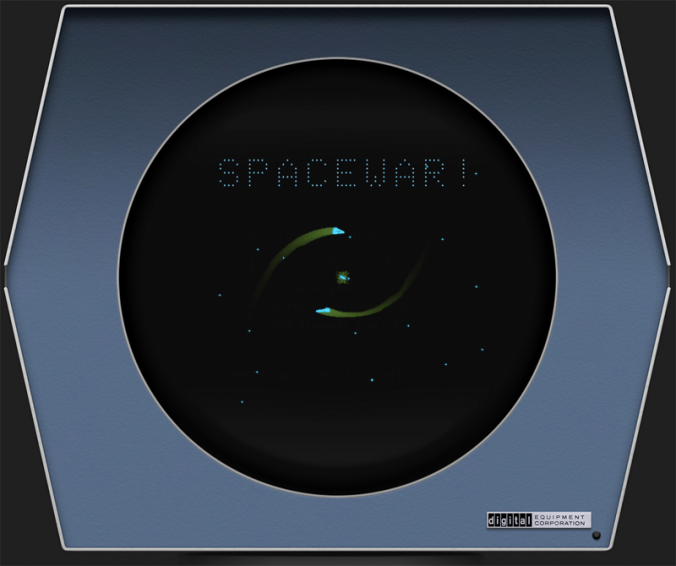
The most authentic way to play — a full PDP-1 emulator running in your web browser. No downloads, no installation. Just the original 1962 code.
Play at masswerk.atSteam (AppID 480)
Valve's Spacewar is a free test application on Steam. Note: it's a simplified modern version, not the original 1962 PDP-1 game. Often used by pirates to disguise cracked games.
Read the Steam FAQModern Remakes
Several developers have created modern remakes of Spacewar! with updated graphics, sound, and online multiplayer. These capture the spirit of the original with quality-of-life improvements.
See remakes belowPlay in Your Browser (Recommended)
The best way to experience the original 1962 Spacewar! is through a PDP-1 emulator running in your web browser. These emulators execute the actual PDP-1 machine code from 1962, giving you the most authentic experience possible without hunting down a working PDP-1 (only about 50 were ever made, and fewer than 10 survive today).
⭐ Top Recommendation: masswerk.at Spacewar Emulator
Norbert Landsteiner's masswerk.at PDP-1 emulator is widely considered the best browser-based PDP-1 emulator. It runs the original Spacewar! code with full accuracy, including the vector CRT display, gravity physics, and hyperspace mechanics.
- URL: https://www.masswerk.at/spacewar/
- Platform: Any modern web browser (Chrome, Firefox, Safari, Edge)
- Cost: Free
- Authenticity: Runs original PDP-1 binary code
- Players: 2 players on one keyboard
Other Browser Emulators
| Emulator | Platform | Notes |
|---|---|---|
| masswerk.at PDP-1 | Web Browser | Most accurate, full PDP-1 emulation, original code |
| SIMH PDP-1 | Windows / Mac / Linux | Desktop emulator, requires PDP-1 paper tape image |
| Java PDP-1 Applet | Desktop (legacy) | Older Java-based emulator, may require Java runtime |
How to Use the Browser Emulator
- Open the emulator in your web browser: masswerk.at/spacewar
- Wait for the PDP-1 to boot — the emulator will load the Spacewar! paper tape automatically. You'll see the CRT display come to life with the star and two ships.
- Learn the keyboard controls — the emulator maps PDP-1 control box functions to keyboard keys. Check the emulator's documentation page for the exact key mapping (typically: Player 1 = A/D rotate, W thrust, Space fire, S hyperspace; Player 2 = J/L rotate, I thrust, K fire, U hyperspace).
- Start playing — both ships are active from the start. Player 1 controls the Needle, Player 2 controls the Wedge. Duel around the central star!
- Adjust settings — most emulators let you adjust CRT phosphor persistence, display scaling, and speed. Experiment to find the most authentic (or most playable) settings.
📝 Emulator Tip
The original PDP-1 ran at approximately 100 kHz — much slower than modern computers. Some emulators run at full PDP-1 speed (which can feel slow), while others offer speed adjustment. If the game feels sluggish, look for a speed or throttle setting in the emulator controls.
Steam Version (AppID 480)
On Steam, there is a game called "Spacewar" with AppID 480. This is not the original 1962 PDP-1 game — it is a test/demo application created by Valve for Steamworks developers to test multiplayer, achievements, and other Steam features.
Key facts about Steam's Spacewar:
- Developer: Valve Corporation
- AppID: 480
- Cost: Free (but not listed in the Steam Store — must be added via console command or developer tools)
- Purpose: Test application for Steamworks SDK
- Gameplay: Simplified 2D space shooter, not the original PDP-1 Spacewar!
- Controversy: Frequently used by game pirates to disguise cracked games as "Spacewar" in the Steam library
For a detailed breakdown of what Steam's Spacewar is, why it might be in your library, whether it's safe, and how to remove it, see our dedicated Steam FAQ.
Read the Full Steam FAQ →Modern Remakes & Homages
Over the years, many developers have created modern remakes and spiritual successors to Spacewar!. These capture the core gameplay — two ships, a gravity well, torpedoes, hyperspace — while adding modern graphics, sound, and quality-of-life features.
Spacewar! (HTML5 Remakes)
Several developers have created HTML5/JavaScript remakes of Spacewar! that run directly in the browser. Search for "spacewar html5" or "spacewar javascript" on GitHub and itch.io. These typically feature modern controls and sometimes online multiplayer.
Free BrowserStar Control (1990)
Created by Toys for Bob and published by Accolade, Star Control is a direct spiritual successor to Spacewar! It features the same core "ship vs ship with gravity" combat, expanded with multiple ship types, each with unique weapons and abilities, plus a strategic meta-game.
Retro PCAsteroids (1979)
Atari's Asteroids, created by Ed Logg and Lyle Rains, was directly inspired by Spacewar! It features the same vector graphics aesthetic and inertia-based movement, but replaces the two-player duel with a single-player survival mode against asteroid fields and UFOs.
Arcade ClassicGravitar (1982)
Another Atari game inspired by Spacewar!, Gravitar emphasizes the gravity mechanics even more strongly. Players navigate a ship through solar systems with realistic gravity, landing on planets to complete missions. A cult classic that's notoriously difficult.
ArcadeOids (1987)
Developed by Dan Hewitt for the Atari ST and later ported to other platforms, Oids is a gravity-based shooter that owes a clear debt to Spacewar! Players rescue enslaved "Oids" from enemy bases, using thrust and gravity to navigate treacherous planetary surfaces.
RetroModern Indie Titles
Search itch.io, Steam, and GitHub for "spacewar," "gravity duel," or "vector combat" to find modern indie takes on the formula. Many are free or low-cost, and some feature online multiplayer, custom ship editors, and tournament modes.
VariousRunning on Original PDP-1 Hardware
If you happen to have access to a working PDP-1 (there are approximately 3-4 known working machines in museums and private collections), you can run the original Spacewar! from a paper tape. The Computer History Museum in Mountain View, California, has a restored PDP-1 that regularly demonstrates Spacewar! to visitors.
The original game was distributed as a paper tape — a long strip of paper with holes punched in it representing the PDP-1 machine code. To load it, you would:
- Mount the Spacewar! paper tape on the PDP-1's tape reader
- Toggle in the bootstrap loader on the front panel switches
- Start the tape reader to load the game into memory
- Jump to the program start address
- Connect the custom control boxes and begin playing
The entire loading process takes about 30-60 seconds — lightning fast for 1962, when loading a program from tape could take minutes.
System Requirements
Browser Emulator
- OS: Any (Windows, Mac, Linux, ChromeOS)
- Browser: Chrome 60+, Firefox 55+, Safari 12+, Edge 79+
- CPU: Any modern processor (emulator is very lightweight)
- RAM: 512 MB free
- Storage: None (runs entirely in browser)
- Input: Keyboard (2 players share one keyboard)
- Internet: Required for initial load
Original PDP-1 (1962)
- Computer: DEC PDP-1 minicomputer
- Memory: 4K–9K words (18-bit each)
- Display: Type 30 CRT, 1024×1024
- Storage: Paper tape reader
- Input: Custom control boxes (2×)
- Power: ~1.5 kW (needs dedicated circuit)
- Cooling: Air-conditioned room recommended
- Cost: $120,000 (1962 USD) — if you can find one
- Footprint: ~2×4 feet of floor space
Start Playing Now
The fastest way to experience Spacewar! is the browser emulator — no downloads, no installation, just the original 1962 game running in your browser.